一个录音波浪动画
根据音量大小变化效果:
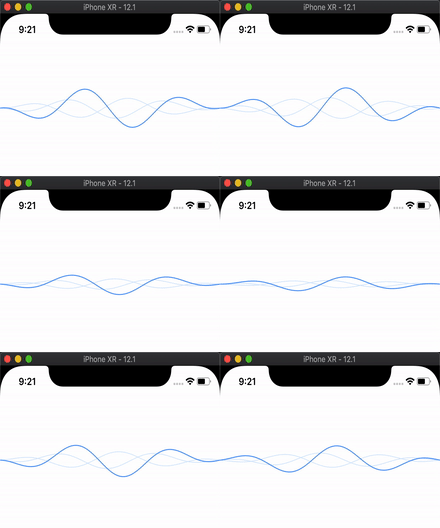
实现
- 使用三角函数计算每一个点(x, y)位置;
- 使用UIBezierPath连接这些点;
- 把path赋值给CAShapeLayer;
三角函数
假设 y = Asin(ωx+φ)+ C
其中:
A 表示振幅,也就是使用这个变量来调整波浪的最大的高度;
ω 与周期相关,周期 T = 2 * pi / ω ,这个变量用来调整同宽度内显示的波浪的数量;
φ 表示波浪横向的偏移,也就是使用这个变量来调整波浪的流动;
C 表示波浪纵向偏移的位置。

//waveMax 波动幅度
//xScale x轴缩放
//yScale y轴缩放
//offset x轴偏移
y = waveMax * yScale * sin(xScale * x + offset);

//两边还要控制一下收敛回到x轴, 需要乘多个sin函数
y = sin((M_PI/width) * x) * waveMax * (yScale * sin(xScale * x + offset));
代码:
AnimationView.h
@interface AnimationView : UIView

@property (nonatomic, readwrite, assign) CGFloat vol; //音量大小 0.0f ~ 1.0f

@end
AnimationView.m
@interface AnimationView ()

@property (nonatomic, readwrite, assign) CGFloat lastVol; //具体应用到view上的音量大小

@property (nonatomic, readwrite, assign) CGFloat offset; //当前曲线x偏移


@property (nonatomic, readwrite, strong) UIBezierPath *path; //主体线条路径

@property (nonatomic, readwrite, strong) UIBezierPath *backPath1; //背景线条路径1

@property (nonatomic, readwrite, strong) UIBezierPath *backPath2; //背景线条路径2


@property (nonatomic, readwrite, strong) CAShapeLayer *shapeLayer; //主体线条Layer

@property (nonatomic, readwrite, strong) CAShapeLayer *backLayer1; //背景线条Layer1

@property (nonatomic, readwrite, strong) CAShapeLayer *backLayer2; //背景线条Layer2


@property (nonatomic, readwrite, strong) CADisplayLink *link; //刷新计时器


@end

@implementation AnimationView

#pragma mark - Life Cycle

- (instancetype)initWithFrame:(CGRect)frame{
    self = [super initWithFrame:frame];

    if (self){
        self.lastVol = 0.5f;

        self.backPath1 = [UIBezierPath bezierPath];
        self.backPath2 = [UIBezierPath bezierPath];
        self.path = [UIBezierPath bezierPath];

        [self.layer addSublayer:self.backLayer1];
        [self.layer addSublayer:self.backLayer2];
        [self.layer addSublayer:self.shapeLayer];

        self.link = [CADisplayLink displayLinkWithTarget:self
                                                selector:@selector(updateShapeLayer)];
        [self.link addToRunLoop:[NSRunLoop currentRunLoop]
                        forMode:NSRunLoopCommonModes];
    }

    return self;
}

- (void)dealloc{
    [self.link invalidate];
}

#pragma mark - Private Methods

- (void)updateShapeLayer{

    CGFloat scale = 2.3f;

    //防止vol值变化太快导致动画跳动
    CGFloat animatedVol = self.lastVol;
    if (self.vol > self.lastVol){
        animatedVol *= 1.04f;
    }else{
        animatedVol *= 0.95f;
    }

    self.lastVol = animatedVol;

    CGFloat height = CGRectGetHeight(self.bounds);
    CGFloat width = CGRectGetWidth(self.bounds);

    [self.path removeAllPoints];
    [self.backPath1 removeAllPoints];
    [self.backPath2 removeAllPoints];

    //起点
    [self.path moveToPoint:CGPointMake(0.0f, height / 2.0f)];
    [self.backPath1 moveToPoint:CGPointMake(0.0f, height / 2.0f)];
    [self.backPath2 moveToPoint:CGPointMake(0.0f, height / 2.0f)];

    CGFloat xScale = 1 / 30.0f;
    CGFloat yScale = 20;
    CGFloat offset = self.offset;
    CGFloat yPadding = height / 2.0f;

    //计算每一个点
    for (CGFloat x = 0.0f; x < width; x += [UIScreen mainScreen].scale){

        CGFloat y = (0.4 + animatedVol * scale) * sin((M_PI/width) * x) * (yScale * sin(xScale * x + offset)) + yPadding;

        [self.path addLineToPoint:CGPointMake(x, y)];


        CGFloat y2 = (0.4 + animatedVol * scale) * sin((M_PI/width) * x) * (10 * sin(xScale * x + offset + 1.1)) + yPadding;

        [self.backPath1 addLineToPoint:CGPointMake(x, y2)];


        CGFloat y3 = - (0.4 + animatedVol * scale) * sin((M_PI/width) * x) * (10 * sin(xScale * x + offset + 0.3)) + yPadding;

        [self.backPath2 addLineToPoint:CGPointMake(x, y3)];
    }

    //终点
    [self.path addLineToPoint:CGPointMake(width, height / 2.0f)];
    [self.backPath1 addLineToPoint:CGPointMake(width, height / 2.0f)];
    [self.backPath2 addLineToPoint:CGPointMake(width, height / 2.0f)];

    [self.shapeLayer setPath:self.path.CGPath];

    [self.backLayer1 setPath:self.backPath1.CGPath];

    [self.backLayer2 setPath:self.backPath2.CGPath];

    //波浪线移动
    self.offset -= 0.28;
    if (self.offset < -60 * M_PI * 2) {
        self.offset = 0;
    }
}

#pragma mark Getters & Setters

- (CAShapeLayer *)shapeLayer{
    if (!_shapeLayer){
        _shapeLayer = [CAShapeLayer layer];
        _shapeLayer.fillColor = [UIColor clearColor].CGColor;
        _shapeLayer.lineWidth = 1.5f;
        _shapeLayer.strokeColor  = [[UIColor colorWithRed:0.325 green:0.60 blue:0.969 alpha:1.0] CGColor];
    }

    return _shapeLayer;
}

- (CAShapeLayer *)backLayer1{
    if (!_backLayer1){
        _backLayer1 = [CAShapeLayer layer];
        _backLayer1.fillColor = [UIColor clearColor].CGColor;
        _backLayer1.lineWidth = 1.0f;
        _backLayer1.strokeColor  = [[UIColor colorWithRed:0.824 green:0.902 blue:0.992 alpha:1.0] CGColor];
    }

    return _backLayer1;
}

- (CAShapeLayer *)backLayer2{
    if (!_backLayer2){
        _backLayer2 = [CAShapeLayer layer];
        _backLayer2.fillColor = [UIColor clearColor].CGColor;
        _backLayer2.lineWidth = 1.0f;
        _backLayer2.strokeColor  = [[UIColor colorWithRed:0.824 green:0.902 blue:0.992 alpha:1.0] CGColor];
    }

    return _backLayer2;
}

@end
参考: iOS 怎么制作出动感的波浪动画